NSC Pro Technical Specifications
This appendix provides the Nano Safety Controller Pro's hardware details: mechanical drawings, the 80-pin connector pinout, electrical ratings, safety output and radio specifications, and the LED codes that report the board's status.
This appendix provides details of the Nano Safety Controller Pro hardware.
The following figures show top (primary side) and bottom (secondary) views of the NSC Pro:
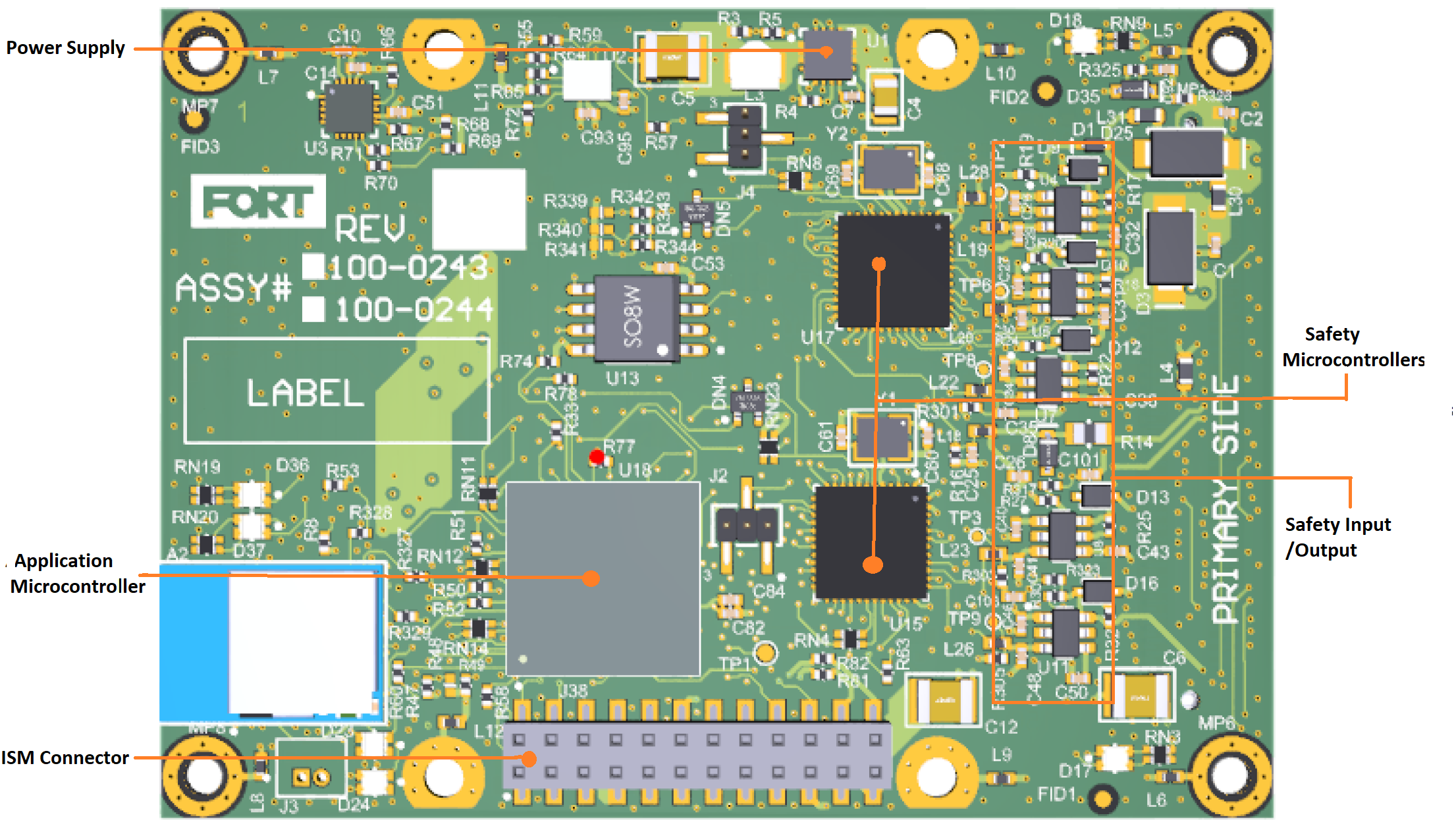
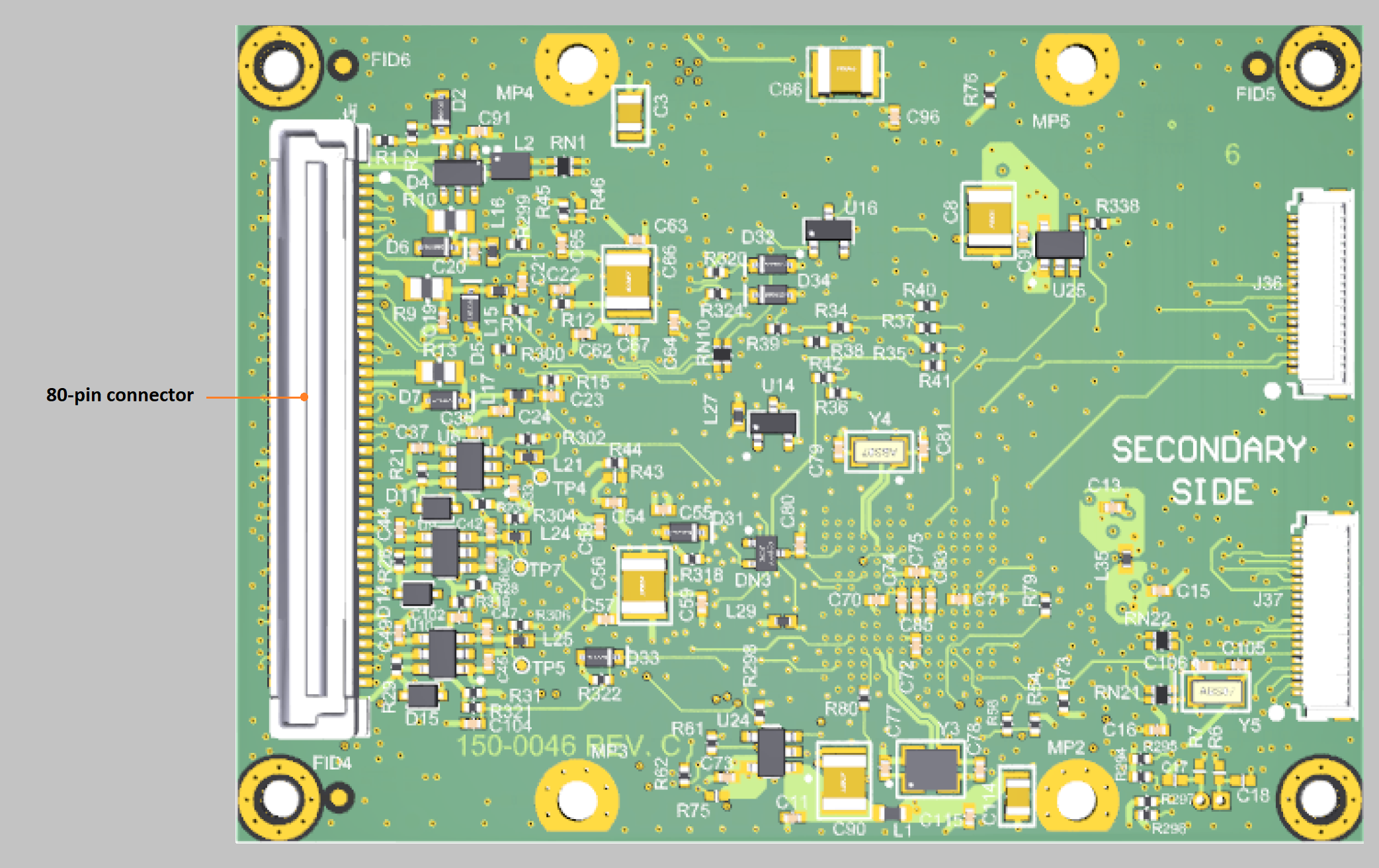
When embedding the Nano Safety Controller Pro in your equipment, keep in mind the following clearances:
-
Primary side of board clearance 4 mm.
-
Secondary side of board clearance > 5 mm
-
Secondary side of board standoff = 9 mm
-
Secondary side of board connector TE 5177986-3 (80-pin connector) — engages with TE 5-5179180-3 connector
See NSC PRO 80-Pin I/O Connector Pinout for a description of the connector pins.
The two connectors on the right of the secondary side of the board, J36 and J37, are for FORT internal use only.
Mechanical Drawings NSC Pro and ISM Radio
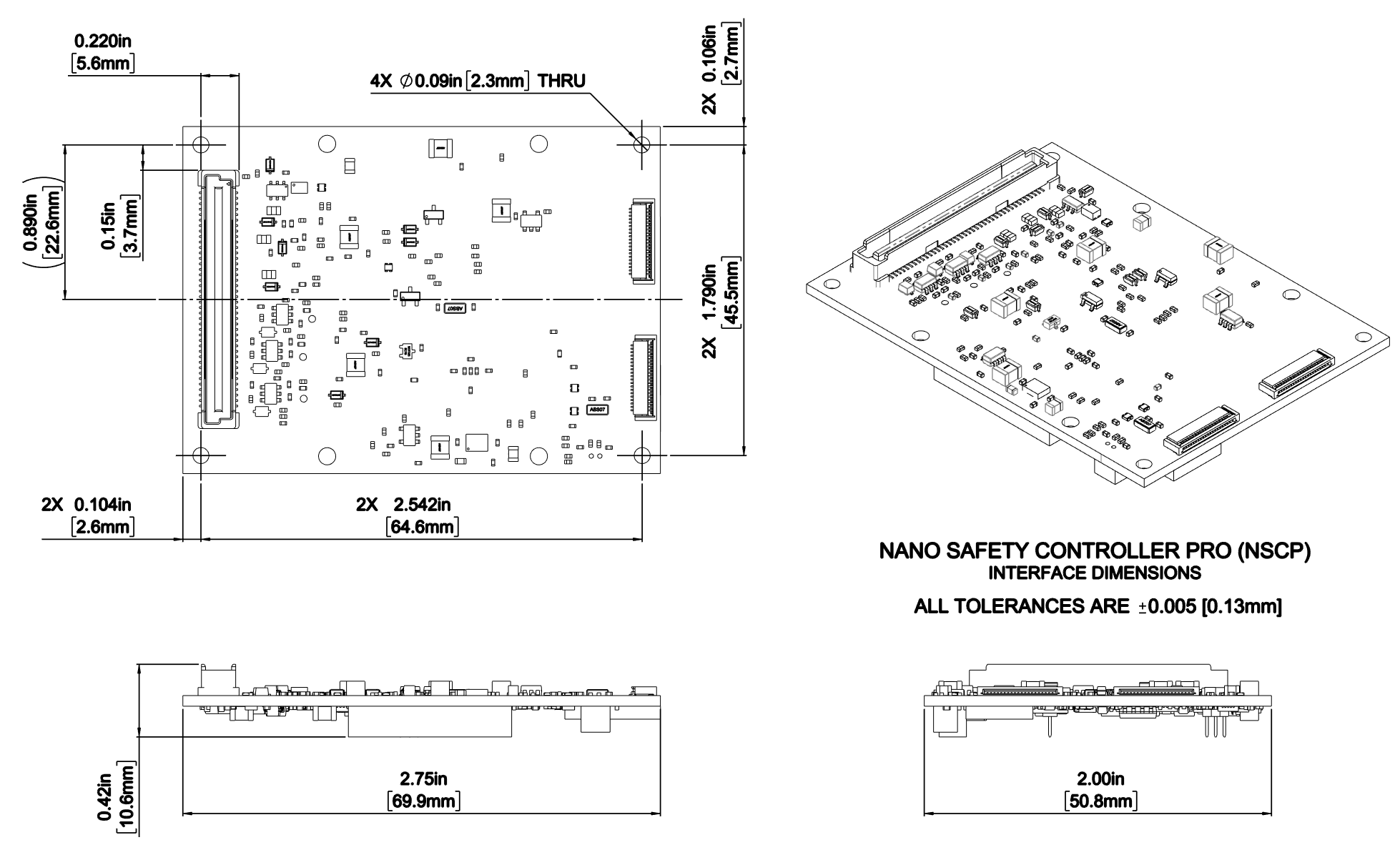
The following figure shows a mechanical drawing of the Nano Safety Controller Pro (without the radio):
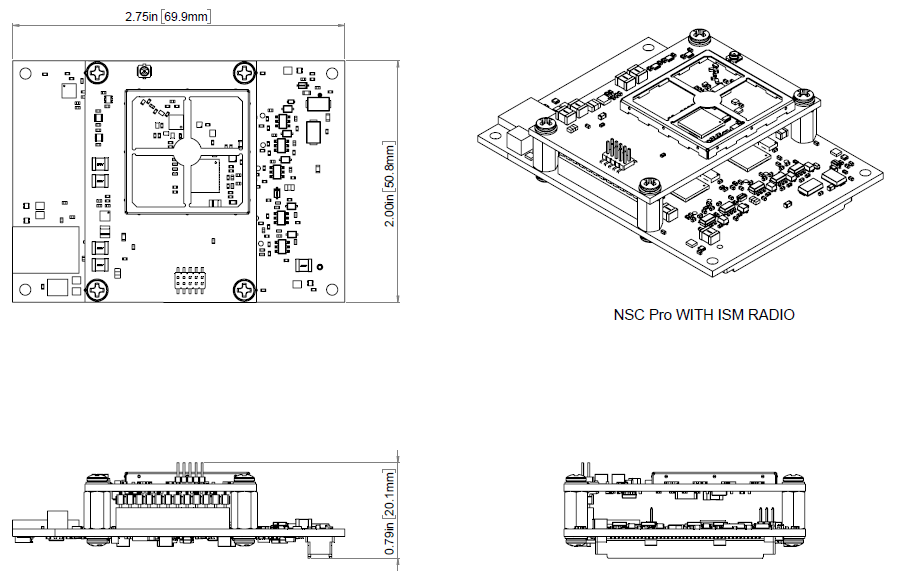
The following figure shows a mechanical drawing of the NSC Pro with the ISM radio:
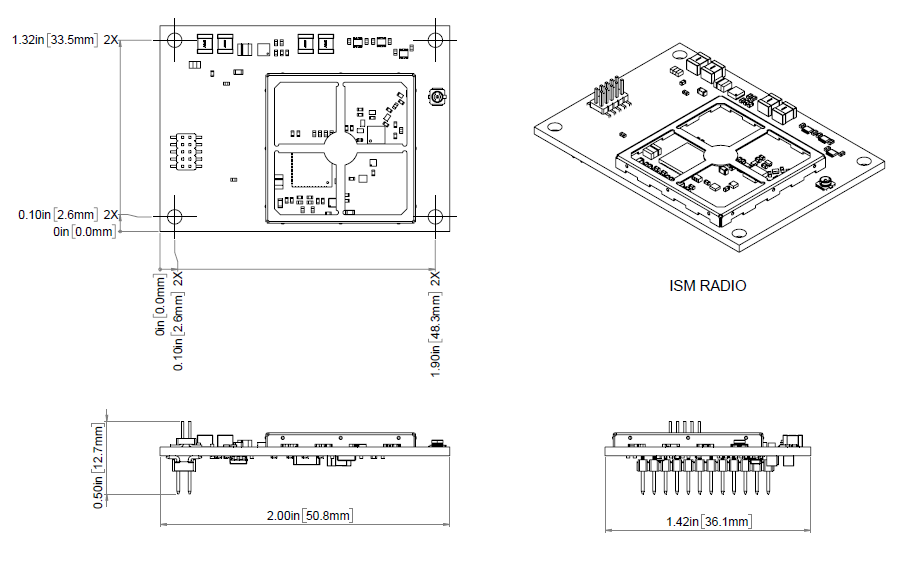
The following figure shows a mechanical drawing of the ISM radio for the NSC Pro:
NSC PRO 80-Pin I/O Connector Pinout
The following table describes each of the Nano Safety Controller Pro’s connector signals. Refer to the table when embedding an NSC Pro receiver in the equipment to control.
| Pin # | Signal Name | Direction | Description |
|---|---|---|---|
| 2 1 | USB_DN | I/O | USB differential pair negative |
| 4 2 | USB_DP | USB differential pair positive | |
| 5 | LED0_OUT | O | Power status GPO (general purpose output) that indicates whether the NSC is powered on. |
| 6 | PVIN_USB | I | USB Power input. |
| 7 | LED1_OUT | O |
Connection status GPO that indicates whether the NSC Pro is connected to the sender over a radio interface (e.g. ISM). Note that this LED does not go high in an EPC to NSC Pro configuration. |
| 8 | GND | GND | Ground |
| 9 | LED2_OUT | O |
Operational status GPO that indicates whether the NSC is fully operational (the firmware and configurations have loaded). |
| 10 | PVIN | I | Main power input |
| 12 | PVIN | I | Main power input |
| 18 | P3V3_OUT | O |
3.3 V output (max current 50mA) from the onboard power supply that you can use to run something small like an LED. |
| 23 | GND | GND | Ground |
| 24 | AP_CAN0_TX | O | AP CAN0 transmit |
| 26 | AP_CAN0_RX | I | AP CAN0 receive |
| 46 | GND | GND | Ground |
| 48 3 | PVBAT | I | Customer supplied backup battery input (3-3.3 V DC); for example to keep a clock running when the NSC Pro is powered off. If you aren’t using a battery tie this pin (PVBAT) to Pin 18 P3V3_OUT. |
| 50 4 | FC0_TX | O | UART0 or IP to UART bridge Transmit |
| 54 | FC0_RX | I | UART0 or IP to UART bridge Receive |
| 55 | OUT1_CH0 | O | Safety Output 1 Channel 0 |
| 57 | OUT1_CH1 | O | Safety Output 1 Channel 1 |
| 58 5 | FC9_TX | O | UART1 or IP to UART bridge transmit |
| 62 | FC9_RX | I | UART1 or IP to UART bridge receive |
| 69 | GND | GND | Ground |
| 78 | OUT2_CH0 | O | Safety Output 2 Channel 0 |
| 79 | EXPBOARD_DET | I | Tie to GND |
| 80 | OUT2_CH1 | O | Safety Output 2 Channel 1 |
Connect a cable-mounted TE 5-5179180-3 (80-pin connector) receptacle to the board-mounted TE 5177986-3 plug on the secondary side of the board.
Specifications
The following table shows details about the Nano Safety Controller Pro.
| Specification | Description |
|---|---|
| Device Form Factor | embedded receiver |
| Dimensions | 50.8 mm x 69.9 mm x 10.4 mm (2.0” x 2.75” x 0.5”) |
| Base Unit Weight | 17 g (29 g with ISM radio) |
| Operating & Storage Temperature | -40°C to +85°C |
| Operating Voltage | 4.5 to 13V DC input |
| Output Radio Transmission Power (conducted RF output) | ISM: -10 dBM to 27 dBM |
| Wired Interface | Serial (UART), CAN |
| CAN Supported Protocols | J1939 protocol |
| Connectors | Embedded board with 80-pin integration, IPEX antenna; |
| Input Voltage | 12V nominal; 4.5 to 13V full range |
| Power Draw | 0.1 - 0.3 W |
| Safety Outputs | 2 dual channels |
| Safety Output Type | digital |
| Pairing | One EPC or one SRC Pro: (up to) 30 NSC Pros |
| Regulatory | FCC, IC, CE compliant (US)(CA)(EU) |
| Certification | E-Stop SIL3 rated per IEC 61508 |
| Extended Warranty | Coming soon, talk to your sales rep |
Recommended and Absolute Maximum Ratings
The following table shows the recommended and absolute maximum ratings for the Nano Safety Controller Pro.
Recommended Operating Conditions
The following table shows the recommended operating conditions for the Nano Safety Controller Pro.
| Parameter | Minimum | Typical | Maximum |
|---|---|---|---|
| PVin (V) | 4.5 V | 13 V | |
| PVin_USB | 4.5 V | 5 V | 5.5 V |
| NSCP Current (not including output loads) | 80 mA (serial comms) | 650 mA (ISM max power) | |
|
Absolute Maximum Current at PVIN pins. Total input current is NSC Pro current plus output driving current. |
1 A | ||
| Output Voltage | 0 | PVin | |
| Output Driving Current (per channel) | 230 mA | ||
| Operational & Storage Temperature | -40 °C | 85 °C |
Safety Output Specifications
The following table provides specifications for the safety outputs:
| Specification | Minimum | Typical | Maximum |
|---|---|---|---|
| PVin | 4.5 V | 13 V | |
| Safety Outputs | Two dual channel outputs | ||
| Output Type | Current Sourcing | ||
| Current (per output channel) | 230 mA | ||
| Output ON State | PVin (4.5 V) | PVin | PVin (13 V) |
| Output safe state | 0 V | 0 V | 0 V |
| OSSD Pulse Width | 300 μS | ||
| OSSD Pulse Period | 200 mS |
Wireless Radio Specifications
You can purchase a Nano Safety Controller Pro with any of several different radios based on frequency requirements and local regulations. Prior to ordering and deployment, consult local regulations to ensure that you are obtaining a device with the proper radio.
North America ISM Radio (NSC Pro)
The following table provides the specifications for North America ISM radio 902-928 MHz:
| Specification | Minimum | Typical | Maximum |
|---|---|---|---|
| Frequency | 902 MHz | 928 MHz | |
| Bandwidth | 600 kHz | ||
| Channels | 21 | 21 | |
| Receive Sensitivity | -100 dBm | ||
| Modulation | 2-GFSK | ||
| Baud Rate | 500 kbps | ||
| Power (conducted RF output) | -10 dBm | 27 dBm | |
| NSC Pro Part number | North America ISM radio is available with NSC Pro model 1001 |
European ISM Radio (NSC Pro)
The following table provides specifications for the European ISM radio:
| Specification | Minimum | Typical | Maximum |
|---|---|---|---|
| Frequency | 869.4 MHz | 869.653 MHz | |
| Bandwidth | 250 kHz | ||
| Channels | 1 | ||
| Receive Sensitivity | -100 dBm | ||
| Modulation | 2-GFSK | ||
| Baud Rate | 200 kbps | ||
| Power (conducted RF output) | -10 dBm | 27 dBm | |
| NSC Pro Part number | EU ISM radio is available in NSC model 1002 |
Long-Range Bluetooth (LRBLE) Radio (NSC Pro)
The following table provides specifications for the Long-Range Bluetooth (LRBLE) radio, which is carried by the NSC Pro 1003 only:
| Specification | Description |
|---|---|
| BLE Long Range Version | Version number |
| Tx Power (conducted RF output) | Conducted RF output, in dBm |
| Receive Sensitivity | Receive sensitivity, in dBm |
| Range | Usable range, in meters |
| NSC Pro Part Number | NSC Pro 1003 |
Data Interfaces (NSC Pro)
The NSC Pro’s integration interface is CAN (Controller Area Network) or UART (Universal Asynchronous Receiver-Transmitter).
The NSC Pro does not have a built-in CAN transceiver so if you use CAN, you must purchase and install your own.
Note that the NSC Pro supports the J1939 protocol only. J1939 Implementation describes CAN communication specifications (data rates and protocol). Use the Endpoint Controller’s dual safety outputs to prevent any motion of the equipment under control (EUC) when the Endpoint Controller receives an emergency stop from either the connected remote device or its wired emergency stop input. The emergency stop inputs are relative to PVin. Maintain a single ground reference for all power and reverence voltages.
The following table provides specifications for the CAN interface:
| Specification | Minimum | Typical | Maximum |
|---|---|---|---|
| CAN TX High Level Output Voltage | 3 V | 3.3 V | |
| CAN TX Low Level Output Voltage | 0 V | 0.1 V | |
| CAN RX Positive Going Input Threshold | 1.5 V | 2.4 V | |
| CAN RX Negative Going Input Threshold | 0.6 V | 1.2 V |
The following table provides specifications for the UART interface:
| Specification | Minimum | Typical | Maximum |
|---|---|---|---|
| CAN TX High Level Output Voltage | 3 V | 3.3 V | |
| CAN TX Low Level Output Voltage | 0 V | 0.1 V | |
| CAN RX Positive Going Input Threshold | 1.5 V | 2.4 V | |
| CAN RX Negative Going Input Threshold | 0.6 V | 1.2 V | |
| UART RX Input Resistance | 3 kΩ | 5 kΩ | 8 kΩ |
| UART Baud Rate | 115200 |
LED Diodes
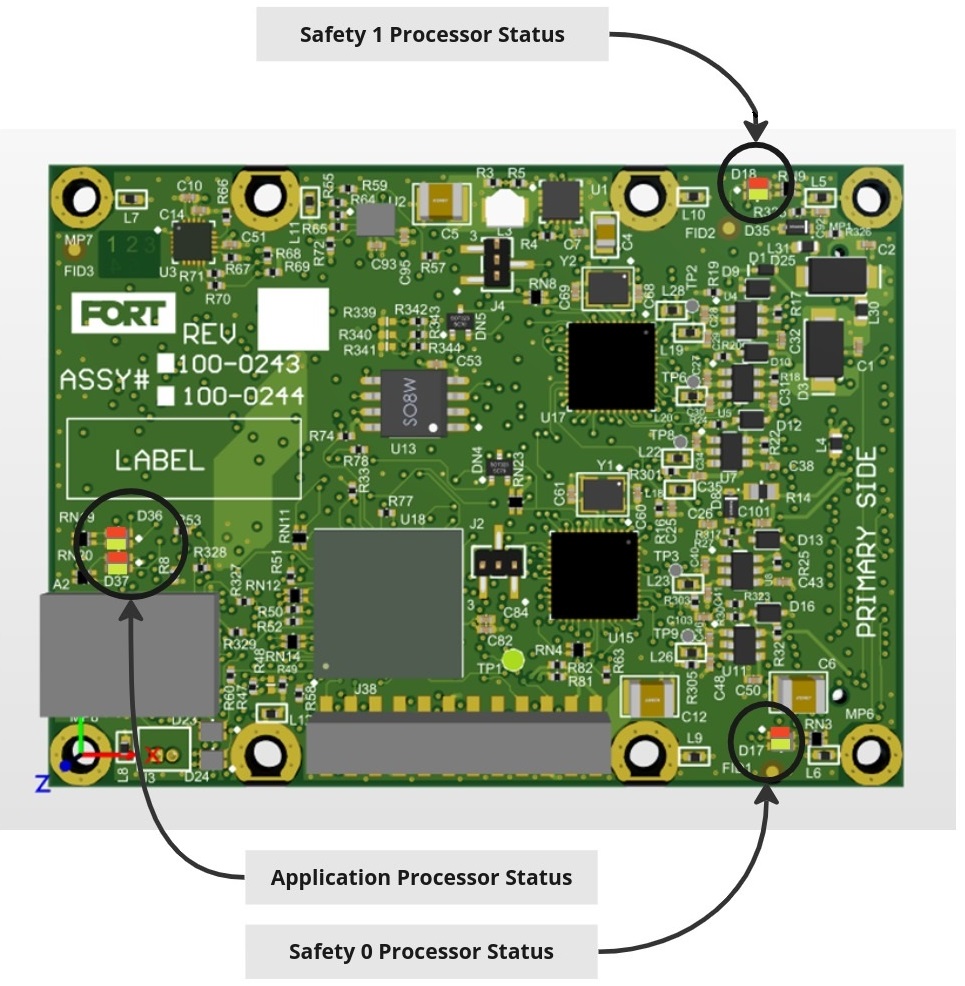
The Nano Safety Controller Pro has four LED lights on the primary side of the board (as shown in the following figure) that are useful for testing (D36 and D37 for the application processor and D17 and D18 for the safety processor):
Application Processor Status During Secure Boot
When power is applied to the NSC Pro, the secure bootloader begins the boot process. The following table lists LED indicators controlled by the application processor bootloader during secure boot.
| LED | Source | Indicates |
|---|---|---|
| D36 Red | Secure bootloader | On (red) when bootloader is executing. |
| D36 Green | Secure bootloader | On (green) when bootloader is launching application firmware. |
| D37 Red | Secure bootloader | On (red) during firmware update, and a flash sector erase is in progress. |
| D37 Green | Secure bootloader | On (green) during firmware update, and a flash sector write is in progress. |
Application Processor Status During Normal Operation
When the application processor firmware is starting, all LED indicators are cleared. The following table lists LED indicators controlled by the application processor firmware during normal operation.
| LED | Source | Indicates |
|---|---|---|
| D36 Red | Application firmware | Undefined (disable) in this context. |
| D36 Green | Application firmware | Undefined (disable) in this context. |
| D37 Red | Application firmware | Undefined (disable) in this context. |
| D37 Green | Application firmware | Blinks (green) at 2Hz when application processor is in normal operation. |
Safety Processor Status During Normal Operation
The following table lists LED indicators controlled by the safety processor firmware during normal operation.
| LED | Source | Indicates |
|---|---|---|
| D17 Red | Application firmware | On (red) when safety outputs are asserted. |
| D17 Green | Application firmware | Blinks (green) at 1Hz when Safety Processor 0 is in run state. |
| D18 Red | Application firmware | On (red) when safety outputs are asserted. |
| D18 Green | Application firmware | Blinks (green) at 1Hz when Safety Processor 1 is in run state. |
Don’t confuse these LEDs on the board with the three GPO connectors (Pins 5, 7, and 9 on the 80 pin connector) that you can wire to external LEDs to provide status information (see NSC PRO 80-Pin I/O Connector Pinout). The LEDs are on the board and hence hidden after you embed the NSC Pro in your equipment, which makes them useful only for testing.
ISM Radio LEDs
The ISM radio board has three LEDs that are useful for testing.
| LED | Schematic | Indicates |
|---|---|---|
| D3 Green | LED_TX | Indicates TX (transmission) activity. |
| D3 Red | LED_TX | Indicates TX Error. |
| D4 Green | LED_RX | Indicates RX (reception) activity. |
| D4 Red | LED_RX | Indicates RX error (remains lit until error is cleared). |
| D5 Green | LED_STAT | Status heartbeat |
| D5 Red | LED_STAT | Status Error (remains lit until error is cleared). |