Wire and Mount Endpoint Controller
This chapter explains how to wire an Endpoint Controller as a sender or as a receiver — safety devices, power, ground, relays, Ethernet, and CAN — and how to place its antennas and mount it on your equipment.
Wiring EPC Sender
When wiring safety devices to an EPC sender, refer to EPC I/O Connector Pinout and Cable, which lists each of the EPC’s connector signals.
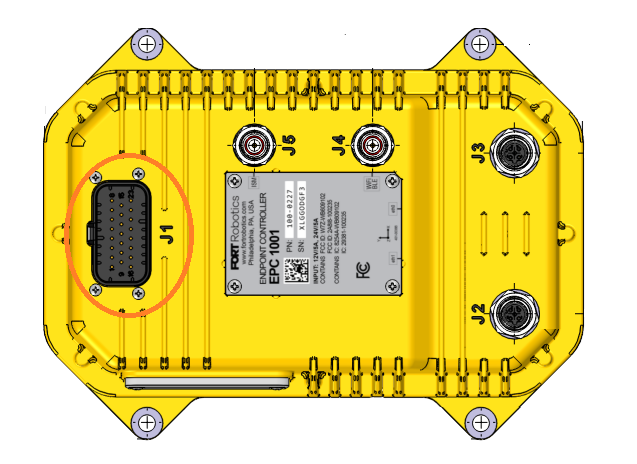
Use the J1 connector on the EPC to wire the EPC to safety devices and a power source.
Connectors are designed to be hand tightened only. Use of a wrench or other tool will cause damage to the connector or cabling.
Before you begin, have on hand:
-
A TE 770680-1 connector, the recommended mating connector to the EPC’s 23 pin port (J1).
-
A FORT #100-0256 Integration Cable to wire safety devices and power to the EPC.
-
The safety device(s) to wire to the EPC. See Input Safety Devices for guidelines in selecting a safety device to use with an EPC.
-
A 12 V or 24 V power source for the EPC.
Wiring Safety Devices and Power to EPC Sender
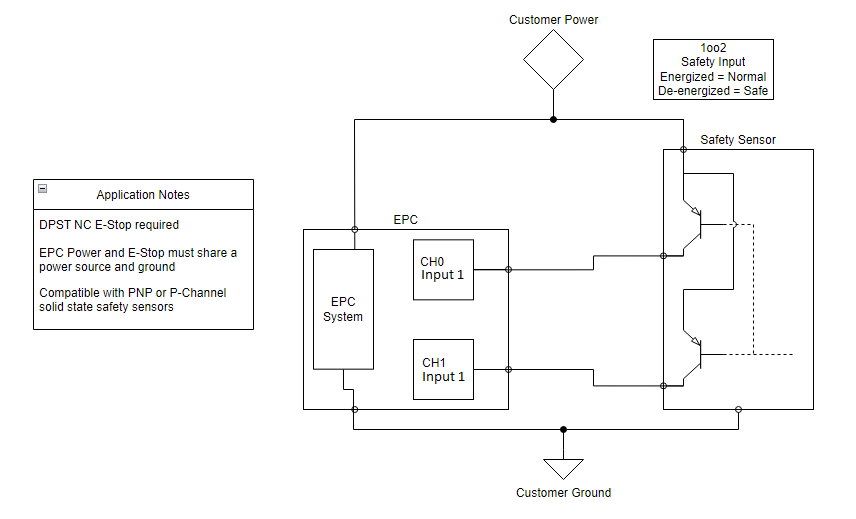
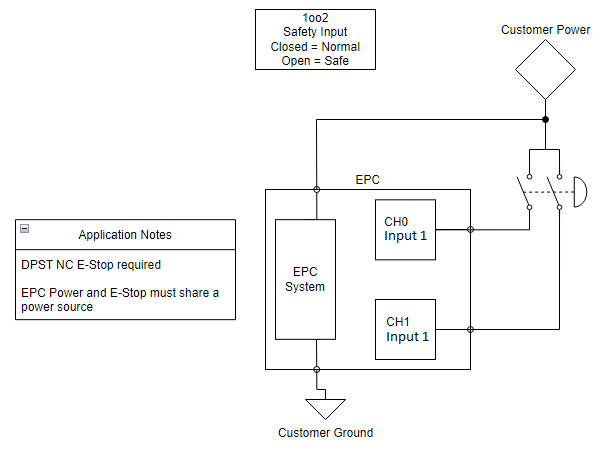
Refer to the figures: Solid State Device Wired to EPC and E-Stop Switch Wired to EPC to see wiring diagrams of safety sensors and E-Stops wired to an EPC.
You can connect either of the following types of devices to an EPC sender:
-
An E-Stop type switch, which is a mechanical switch (internally contains two redundant switches).
-
Switches remain closed until someone pushes the E-Stop button, at which point the internal switches open.
-
A DPST NC (double-pole single-throw, normally closed) E-Stop is required so that both switches activate at the same time.
-
-
A solid state safety device.
-
A DPST NC (double-pole single-throw, normally closed) safety sensor is required so that both switches activate at the same time.
-
You can use a PNP or P-Channel solid state safety sensor.
-
You can use a PLC with no pulse testing on the PLC outputs, which provides a category 3 circuit (meeting SIL 2 and PLd standards). Getting a SIL 3 rating ideally requires a SIL 3 or PLe rated input device. Note that you can configure the safety PLC with pulse testing enabled on the outputs tied to the EPC, which is essentially the same as using an OSSD device.
Ensure that your power supply is either 12 V or 24 V.
The EPC power and the safety devices must share ground reference.
For each safety input, you must use redundant connections.
To wire safety devices and power to the EPC:
Make sure that the Device Safety I/O Settings in FORT Manager match the inputs that you are wiring here.
In most configurations you can wire Input 1, Input 2, or both. In a Two-to-One configuration with a WES Pro and an EPC, the configuration's Output to Control setting determines which single input is used — Input 1 for Output #1, Input 2 for Output #2 — and the other is grayed out in FORT Manager. Wire only the input your configuration uses. For more information, see Choosing Which Output the Senders Control.
-
Attach the TE 770680-1 connector and FORT #100-0256 Integration Cable to the J1 port on the EPC.
-
Connect pin 3 (Channel 1, Input 1) and pin 6 (Channel 0, Input 1) to the safety device.
-
Connect pin 2 (Channel 1, Input 2) and pin 5 (Channel 0, Input 2) to the safety device.
-
Connect Pins 7 & 8 (PVin_RTN) to the negative polarity terminal of the power supply.
-
Connect Pins 14 & 15 (PVin_IN) to the positive polarity terminal of the power supply.
-
Connect Pin 9 (CH_GND) to ground. Connect to common power supply if earth ground is not available. See Grounding an EPC for more information.
-
Connect the safety device to a common power supply and ground (see following two figures).
The following figure shows a diagram of a solid state device, such as a light curtain, wired to one of the dual channel inputs on an EPC sender.
The following figure shows a diagram of an E-Stop switch wired to one of the dual channel inputs on an EPC sender.
Grounding an EPC
Connect Pin 9 CH_GND to power supply common if an earth ground is not available.
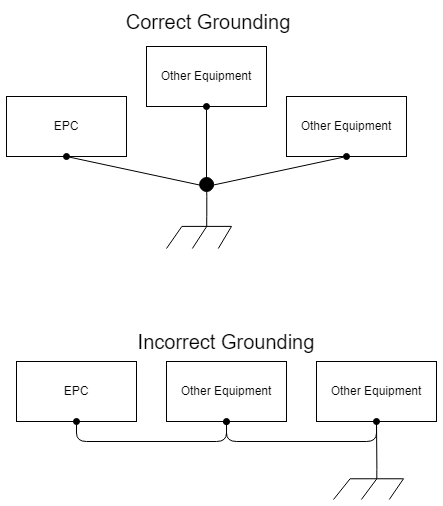
Be certain that there is only one path for return current between the host and receiving nodes. Otherwise, if a network is grounded in more than one location, parasitic current will flow. By grounding a network only at the source, you avoid potentially hazardous ground loops. We recommend using digital isolators such as the ISO721 (SLLS629) if you must connect the grounds of different sources. Ensure that you ground unused pins in connectors and unused wires in cables at a single point on the connector. Ground unused wires at alternate ends to nearby ground pins.
The following diagram shows examples of both correct and incorrect grounding:
Input Safety Devices
The following table provides guidelines for the types of devices that you can use.
| Device | Requirement |
|---|---|
| Emergency stop switches | Use approved devices with direct opening mechanisms that comply with IEC/EN 60947-5-1. |
| Door interlocking switches, limit switches | Use approved devices with direct opening mechanisms that comply with IEC/EN 60947-5-1 and capable of switching micro loads of 24V DC, 3 mA. |
| Safety sensors | Use approved devices that comply with the relevant product standards, regulations, and rules in the country in which they are used. |
| Relays with forcibly guided contacts, contactors | Use approved devices with forcibly guided contacts that comply with EN 50205. For feedback purposes, use devices with contacts capable of switching micro loads of 24V DC, 3 mA. |
| Other devices | Evaluate whether devices to use are appropriate to satisfy the requirements of safety category levels. |
How a sender's safety inputs are assigned depends on the configuration. In some configurations the assignment is fixed and FORT Manager offers no options — this applies to the EPC sender in an SRC Pro with Global E-Stop Configuration and in a Two-to-One over Long-Range Bluetooth. In others you choose it — in a Two-to-One with a WES Pro and an EPC, the EPC sender's Input 1 is configurable and is the input that stops the machine.
Before wiring a sender, check which input its configuration uses.
Connecting an EPC Sender to Ethernet
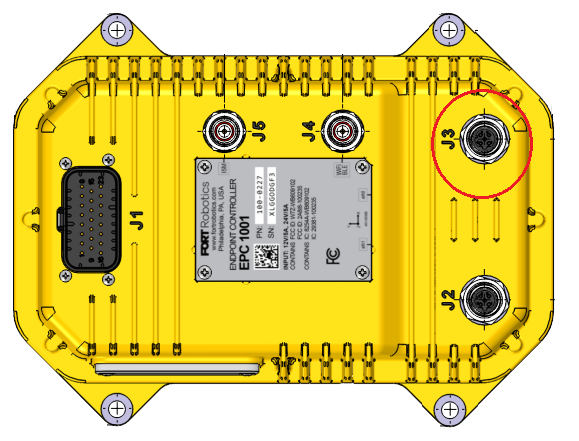
If you plan to use Ethernet for communication, connect the J3 port to your Ethernet gateway using an M12 - D cable:
Placing an ISM Radio Antenna on EPC Sender
If you plan to use ISM Radio for communication, you must place an antenna on the J5 quick disconnect antenna port.
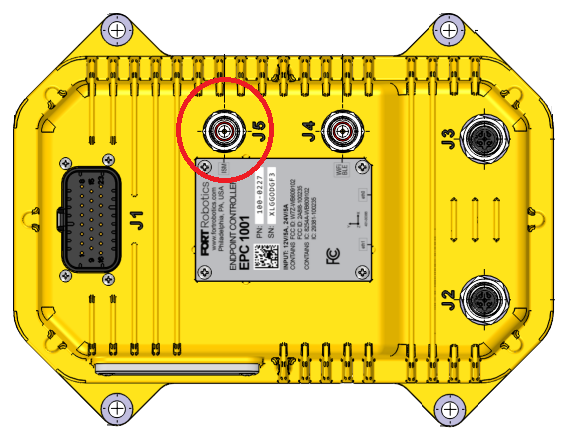
Connectors are designed to be hand tightened only. Use of a wrench or other tool will cause damage to the connector or cabling.
Operating an ISM radio without an antenna installed could damage the unit.
Use grommets when routing the antenna cable through enclosures.
Antennas provides a list of FORT recommended antennas, but you may use use your own antenna if you so choose. Be certain that it meets the standards for antennas listed in Notifications and Certifications.
Ideally, you should place the antenna such that is has a clear line of sight (LOS), it’s not too high or too low, no metal is between it and the sender, and it’s pointed straight up (whip antenna), or pointed towards other devices (puck antenna).
Placing a WiFi / BLE Antenna on EPC Sender
If you plan to use Wi-Fi or BLE for communication, you must place an antenna on the J4 quick disconnect antenna port.
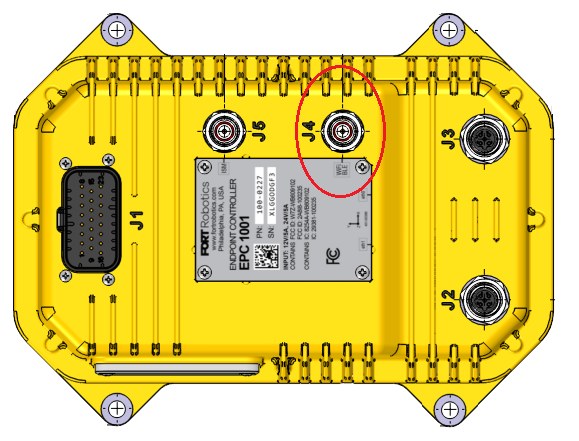
Connectors are designed to be hand tightened only. Use of a wrench or other tool will cause damage to the connector or cabling.
Use grommets when routing the antenna cable through enclosures.
Antennas provides a list of FORT recommended antennas, but you may use use your own antenna if you so choose. Be certain that it meets the standards for antennas listed in Notifications and Certifications.
Ideally, you should place the antenna such that is has a clear line of sight (LOS), it’s not too high or too low, no metal is between it and the sender, and it’s pointed straight up (whip antenna), or pointed towards other devices (puck antenna).
Wiring EPC Receivers
When wiring an EPC receiver to your equipment (equipment under control, or EUC), refer to EPC I/O Connector Pinout and Cable, which lists each of the EPC’s connector signals.
Use the J1 connector on the EPC to wire the EPC to the EUC, a power source, and optionally to a CAN bus.
Connectors are designed to be hand tightened only. Use of a wrench or other tool will cause damage to the connector or cabling.
Before you begin, have on hand:
-
A TE 770680-1 connector, the recommended mating connector to the EPC’s 23 pin port.
-
A FORT #100-0256 Integration Cable to wire the EPC to your equipment.
-
The relays to attach to the EUC. See EPC Recommended and Tested Relays for a list.
Warning:Do not use latching relays because the contactors of a latching relay will not open after power is removed from the coil, thereby creating an unsafe situation.
We highly recommend that you use relays that require manual reset, not relays that reset automatically; see Selecting Automatic or Manual Reset for Relays.
Wiring EPC Receivers with EPC or WES Pro Sender
This section explains how to wire an EPC receiver in a configuration with an EPC or WES Pro sender. See Wiring Receivers with an SRC Pro Sender if the sender includes an SRC Pro.
For each EPC safety output that you want to use, you must connect both channels to two relays that are connected in series, or to a dual channel safety relay. The circuit that is defined by these relays controls connection of a solenoid to the equipment under control. If safety is not requested, the EPC keeps the output on to keep the relays closed. On the other hand, if safety is requested, the EPC turns off the outputs, which opens the relays and breaks connection of the circuit to the EUC. In this case, if the EUC is using the circuit for power, when the contactors open, the machine shuts off.
Refer to the figure: EPC Safety Output Diagram to see a wiring diagram of one EPC output connected to two relays in series to control the power supply of the EUC.
The type of sender in your configuration determines which outputs you can wire on the EPC receiver:
-
In a configuration with an EPC sender, you can wire Output 1, Output 2, or both on the EPC receiver.
-
In a configuration with a WES Pro sender, you can wire either Output 1 or Output 2, but not both on the EPC receiver.
Make certain that the outputs specified in FORT Manager match the wiring you are doing here.
To wire safety outputs on an EPC receiver to your equipment:
-
Attach the TE 770680-1 connector and FORT #100-0256 Integration Cable to the J1 port on the EPC.
-
For Output 1, connect pin 18 (Channel 1, Output 1) and pin 23 (Channel 0, Output 1) to the safety device.
-
For Output 2, connect pin 17 (Channel 1, Output 2) and pin 22 (Channel 0, Output 2) to the safety device.
Output 3 is reserved for use in a configuration with an SRC Pro.
-
Connect Pins 7 & 8 (PVin_RTN) to the negative polarity terminal of the EUC power supply.
-
Connect Pins 14 & 15 (PVin_IN) to the positive polarity terminal of the EUC power supply.
-
Connect Pin 9 (CH_GND) to ground. Connect to common power supply if earth ground is not available such as in a moving vehicle. See Grounding Receiver EPCs for more information.
-
Connect the safety device to common power supply and ground (see following two figures).
Each output on the EPC is designed with short circuit protection circuitry inside the EPC device. However, drawing more than 750 mA must be avoided since it won’t activate short circuit protection and could potentially damage the device. To satisfy applicable wiring codes and conditions, you are responsible for protection of field devices and wiring through appropriate fusing of the circuitry.
The following figure shows an example of the two channels (CH0 and CH1) of one Endpoint Controller (EPC) output connected to two relays in series to control the power supply of the EUC:
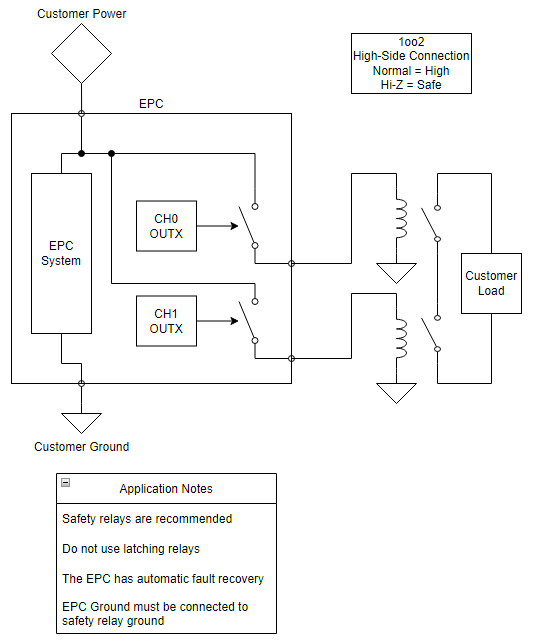
Note the following about this setup:
-
You must connect the EPC ground to the safety relay ground.
-
The EPC has automatic fault recovery.
-
We recommend using one of the relays that we have tested (from the following table) but if you don’t use one of these, be certain to use a safety relay.
The EPC utilizes OSSD test pulses to detect shorts, so the downstream safety input must be able to filter out these pulses. See OSSD Pulses for detailed information on how Pro series receivers use OSSD pulses.
Do not use latching relays because the contactors of a latching relay will not open after power is removed from the coil, thereby creating an unsafe situation.
We highly recommend that you use relays that require manual reset, not relays that reset automatically; see Selecting Automatic or Manual Reset for Relays.
| Manufacturer | Model | Supply Voltage |
|---|---|---|
| Allen-Bradley | MSR127TP | 24V |
| EATON | ESR5-NV3-30 | 24V |
| PILZ | 751104 | 24V |
| IDEM | SCR-3-1P-i | 24V |
| OMRON | G7SA-3A1B | 24V |
| PANASONIC | SFS3-L-DC12V-D | 12V |
See Recommended Relays for wiring diagrams for each of these relays.
Wiring Receivers with an SRC Pro Sender
How you wire an EPC receiver in a configuration with an SRC Pro sender depends on whether the EUC has autonomous capability.
The information in this section applies to any configuration that includes an SRC Pro sender and has EPC receivers:
-
Machine Select configuration (SRC Pro sender and EPC receiver(s)).
-
SRC Pro with Global E-Stop Configuration (SRC Pro and EPC sender with EPC receiver(s)).
-
Two-to-One Configuration (SRC Pro and WES Pro sender with EPC receiver).
Wiring an EPC to an EUC Without Autonomous Capability
A machine that does not have autonomous capability can operate in supervised mode only.
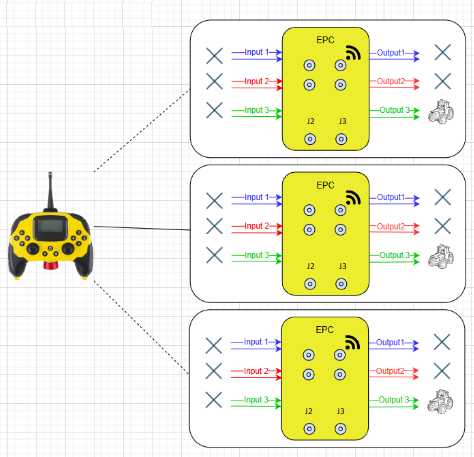
As shown in the following figure, you must connect Output 3 on each of the EPCs to the equipment under control (EUC). Wiring EPC Receivers with EPC or WES Pro Sender provides details about the wiring, but essentially, both channels of Output 3 are connected to two relays in series. The circuit that is defined by these relays controls connection of a solenoid to the equipment under control. If safety is not requested, the EPC keeps the output on to keep the relays’ contactors closed. On the other hand, if safety is requested, the EPC turns off the outputs, which opens the relays and breaks connection of the circuit to the EUC. In this case, if the EUC is using the circuit for power, when the contactors open, the machine shuts off.
The following figure illustrates the wiring for machines that don’t have autonomous capability. See Wiring an EPC to use with Machines With Autonomous Capability for the wiring for machines that do require autonomous operation.
Although the figure shows a single SRC Pro sender, the wiring for the EPC’s would be the same if an EPC or WES Pro were added as senders.
Initially, when a user selects a machine and connects to it, the EPC is put in supervised mode. Using the LCD display and Safe Remote Control Pro controls, the user can change the mode of the EPC to unsupervised.
Input 3 is the way that you (the customer) control the safety system when an SRC Pro is not connected. (Note that you could also build a hybrid configuration and use Global E-Stop with an EPC sender to control the safety system when the SRC Pro is not connected to the EPC).
In unsupervised mode, and as long as Input 3 of the EPC is high, the EPC keeps the two relays connected to Output 3 powered while ignoring an E-Stop press on the Safe Remote Control Pro as well as not responding to joystick movements and button presses on the SRC Pro.
Wiring an EPC to use with Machines With Autonomous Capability
The following figure illustrates the wiring for machines with autonomous capability that require operation in unsupervised mode.
Although the figure shows a single SRC Pro sender, the wiring for the EPC’s would be the same if an EPC or WES Pro were added as senders.
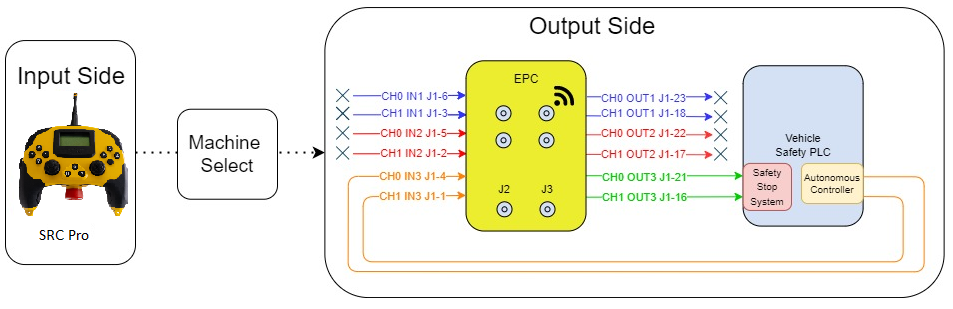
As long as the customer safety signal to Input 3 on the EPC remains in the normal state (high), the machine remains powered up and running. If the customer safety signal to the EPC changes out of the normal state, the EPC automatically switches to safe mode, turning off Output 3, and breaking the power connection to the EUC. Machines such as this can operate in supervised or unsupervised mode. In fact, when first connected to an SRC Pro, they are always in supervised mode.
Selecting Automatic or Manual Reset for Relays
When designing and implementing the safety circuit downstream from the EPC, including the safety relays, be certain to reference ISO 13850, which defines the core principles for designing and implementing an emergency stop (E‑stop) function on machinery, and ISO 13849-1, which defines how to design and validate safety-related parts of control systems on machinery.
We highly recommend that for an EPC’s output you attach relays that require manual reset, not relays that reset automatically. If you choose to use relays that reset automatically, be certain that your safety system prevents a hazardous situation from occurring when relays reset automatically.
Do not connect latching relays to EPC outputs because the contactors of a latching relay will not open after power is removed from the coil, thereby creating an unsafe situation.
Grounding Receiver EPCs
Connect Pin 9 CH_GND to power supply common if an earth ground is not available (such as in a moving vehicle).
Be certain that there is only one path for return current between the host and receiving nodes. Otherwise, if a network is grounded in more than one location, parasitic current will flow. By grounding a network only at the source, you avoid potentially hazardous ground loops. We recommend using digital isolators such as the ISO721 (SLLS629) if you must connect the grounds of different sources. Ensure that you ground unused pins in connectors and unused wires in cables at a single point on the connector. Ground unused wires at alternate ends to nearby ground pins.
In addition, if you require a pull down resistor in order to make the output signal go to ground when an E-Stop is triggered, we recommend using a 1.6k ohm resistor to pull the output pins (16, 17, 18, 21, 22, and 23, depending on which ones are used) to ground.
The following diagram shows examples of both correct and incorrect grounding:
Engine Cranking (EPC)
If you attach the EPC to an ignition circuit, be aware that engine cranking can drop the voltage below 8 V (on a 12 V system) causing the EPC to turn off the outputs and triggering a safe state. In addition, cranking may drop the voltage low enough that the EPC temporarily stops functioning and resets. You should assess whether this behavior is a safety issue for your application. It may not be. For example, if the EPC doesn’t power up until after the equipment is running, cranking the engine shouldn’t affect the EPC. On the other hand, you can avoid this problem altogether by making certain that the EPC is not part of an ignition circuit.
Connecting an EPC Receiver to Ethernet
If you plan to use Ethernet for communication, connect the J3 port to your Ethernet gateway using an M12 - D cable:
CAN Interface
If you are using CAN, which is optional, connect the CAN bus from the EPC to the EUC (CAN1_L and CAN1_H, pins 11 and 12,).
Termination resistors are important for reliable CAN bus communication. The EPC integration cable does not come with any termination inside the cable. You may need a 120 ohm termination resistor if one isn’t already present in the CAN network.
If you require shielding, wire CAN1_SHIELD (pin 13) to the EUC.
If you are using a shield, we recommend crimping a short pigtail to the shield end at each connector and then bringing it through a separate connector pin to a ground pin located as close to the connector as possible. You should ground the network to a single point at the source location, which prevents parasitic currents from flowing in the shield between ground connections. If you shield individual signal pairs, use the same terminating technique as for the overall shield.
Placing an ISM Radio Antenna on EPC Receiver
If you plan to use ISM Radio for communication, you must place an antenna on the J5 quick disconnect antenna port.
Connectors are designed to be hand tightened only. Use of a wrench or other tool will cause damage to the connector or cabling.
Operating an ISM radio without an antenna installed could damage the unit.
Use grommets when routing the antenna cable through enclosures.
Antennas provides a list of FORT recommended antennas, but you may use use your own antenna if you so choose. Be certain that it meets the standards for antennas listed in Notifications and Certifications.
Ideally, you should place the antenna such that is has a clear line of sight (LOS), it’s not too high or too low, no metal is between it and the sender, and it’s pointed straight up (whip antenna), or pointed towards other devices (puck antenna).
Placing a WiFi / BLE Antenna on EPC Receiver
If you plan to use Wi-Fi or BLE for communication, you must place an antenna on the J4 quick disconnect antenna port.
Connectors are designed to be hand tightened only. Use of a wrench or other tool will cause damage to the connector or cabling.
Use grommets when routing the antenna cable through enclosures.
Antennas provides a list of FORT recommended antennas, but you may use use your own antenna if you so choose. Be certain that it meets the standards for antennas listed in Notifications and Certifications.
Ideally, you should place the antenna such that is has a clear line of sight (LOS), it’s not too high or too low, no metal is between it and the sender, and it’s pointed straight up (whip antenna), or pointed towards other devices (puck antenna).
Mounting an EPC
An Endpoint Controller has four mounting holes to attach it to the equipment under control, EUC (receiver), or your chosen structure (sender) as shown in the following figure. We recommend using ¼-20 or M6 machine screws for mounting.
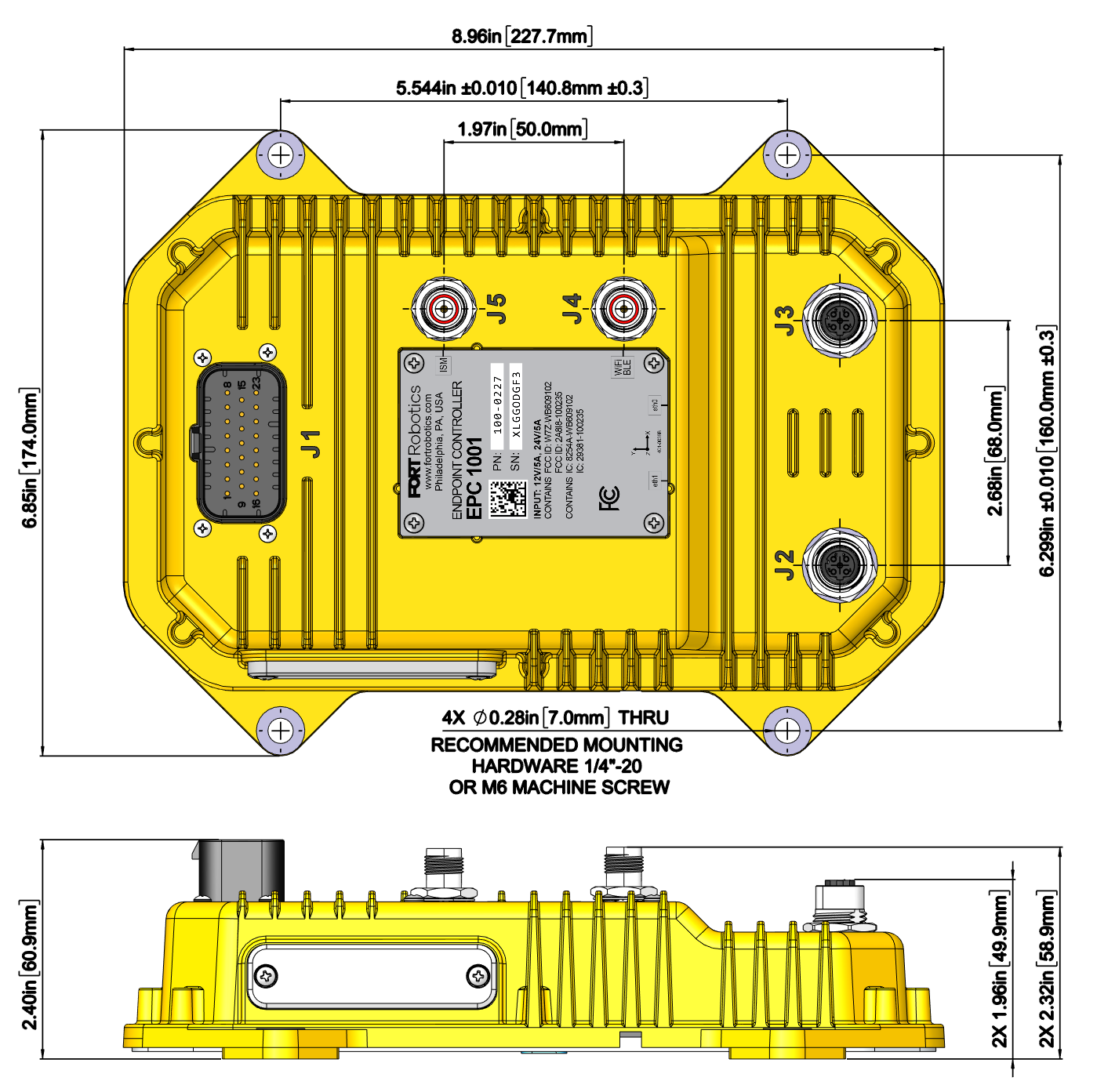
If you are locating the EPC outside or attaching it to equipment that is operating outside or can be exposed to any amount of water, you must mount the EPC vertically. Mounting the EPC horizontally allows water to pool and block airflow through a membrane, potentially causing the EPC to malfunction.
In addition, avoid placing the EPC in an area or on a machine with extended exposure to direct sunlight.