OSSD Pulses
This appendix explains how EPC receivers and NSC Pros use OSSD test pulses to detect shorted outputs, describes the side effects those pulses can have on the equipment wired to them, and shows how to turn them off.
An EPC receiver and NSC Pro generate OSSD (Output Signal Switching Device) test pulses that allow the device to detect a shorted output to battery (or a voltage source) and output wires that are shorted together. If a fault is detected, the safety system triggers a safe state.
OSSD pulses are only generated when an output is commanded ON (i.e. when safety is not being requested). They are not generated when the output is commanded off (i.e. when safety is being requested).
When an output is commanded ON, the safety system of the receiver device periodically turns off that output for a short period of time to detect the presence or lack of a voltage at the output pin. If a voltage is detected, it is treated as a fault, and both redundant outputs are turned off. The fault will persist and cannot be cleared until both of these conditions are met:
-
The underlying cause of the fault has been resolved.
-
The receiver has been power-cycled.
Besides applying OSSD, NSC Pros and EPC receivers perform an additional diagnostic test when an output has been commanded OFF; the receiver checks the voltage at the output pin and if it senses a voltage, it detects that a shorted output to battery (or some other voltage source) is present. The fault will persist and cannot be cleared until both of these conditions are met:
-
The underlying cause of the fault has been resolved.
-
The receiver has been power-cycled.
Characteristics of OSSD pulses:
-
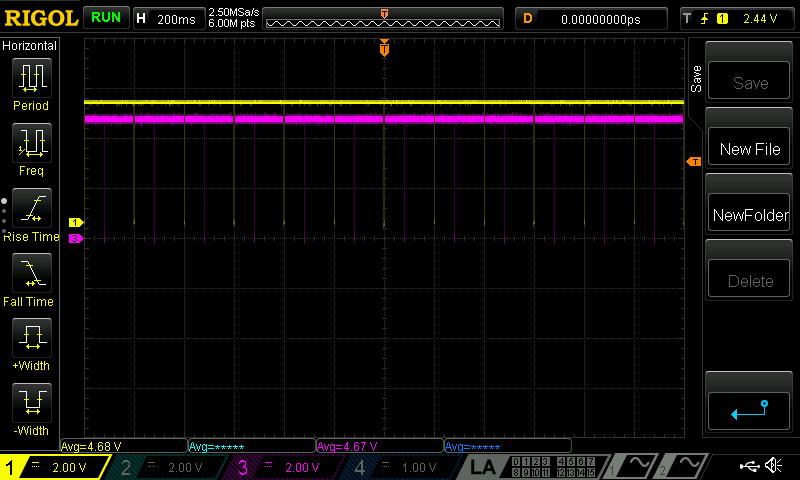
OSSD pulse width = ~300 μS
-
OSSD pulse period = ~ 200 mS
The following figure shows OSSD pulses; note the 200 ms spacing between each of the yellow channel 0 pulses and the 100ms spacing between each yellow channel 0 pulse and pink channel 1 pulse:
Configurability of OSSD pulses
On EPC receivers, OSSD is not configurable and OSSD pulses are always generated when safety is not being requested (i.e. when an output is commanded ON).
On NSC Pros, OSSD is configurable and can be turned ON (default) or OFF in FORT Manager (see below for details).
Potential side effects of OSSD pulses
If you use the recommended relays that have been tested by FORT and listed in the user’s manual for the receiver device that you are using, you will not see any side effects.
However, for both an EPC receiver and an NSC Pro, if you use relays other than those listed in the user’s manual, OSSD pulses may cause chatter on the contactor side of the relays.
If you notice chatter on the contactor side of the relays while using an NSC Pro without the recommended relays, you can turn off OSSD in FORT Manager but be aware that NSC Pro will not be able to detect a shorted output to battery while the outputs are commanded ON (i.e. when safety is not being requested).
If you notice chatter on the contactor side of the relays while using an EPC without the recommended relays, you must either switch to using a recommended relay or come up with your own filter to negate the effect of the OSSD pulses.
In all cases, consult the documentation for your chosen relay and verify that it is compatible with OSSD pulses and meets any other safety or reliability requirements of the application.
To Turn OSSD Off
You can turn OSSD off in FORT Manger for an NSC Pro, as follows:
-
Open FORT Manager, click Configurations > New Setup and build a configuration (give it a name, add a sender(s), and NSC Pro receiver(s)).
-
Select Settings > Devices and select an NSC Pro.
-
Click Off to toggle the OSSD switch off (it’s on by default).
-
Make sure other settings are correct and click Save to save the settings for this device.
-
- Repeat for any other NSC Pros for which to turn off OSSD pulses.
-
You can mix and match, turning OSSD off for some devices and leaving it on for others.
-
Click Done when you’ve configured all desired and necessary settings.